ByteMint Guide
Laptop Storage Optimisation Prompt
Disk Cleanup Guide
Before you start
- Codex: ChatGPT Plus, Pro, Team, or Business access, in the terminal or the desktop app.
- Full Disk Access enabled for Codex under System Settings → Privacy & Security, so it can actually see protected folders.
- 10 minutes, and you approving each deletion before anything runs.
1
Step
Paste This Prompt Into Codex
Open Codex and paste the prompt below as is. It's read-only, so it scans, sizes, and reports without touching anything. Nothing gets deleted until you say so.
Prompt for Codex
My Mac's storage is nearly full. Do a full, systematic disk usage audit — read-only, no deletions yet.

1. SCAN & SIZE
- Get overall disk usage (used/free/total)
- Find the top 30 largest files across the system (~/, /Applications, ~/Library, /private/var, Downloads, Desktop, Documents)
- Find the top 15 largest folders by cumulative size

2. REDUNDANCY CHECK
- Find duplicate files (by hash, not just name) in Downloads, Documents, Desktop
- Flag old installer files (.dmg, .pkg) sitting in Downloads
- Flag Xcode/Android Studio caches, Docker images/volumes, node_modules folders older than 30 days with no recent parent-project activity
- Flag old iOS/system backups, Time Machine local snapshots, and browser caches

3. OPTIMIZATION CANDIDATES
- List app caches and logs safe to clear (~/Library/Caches, ~/Library/Logs)
- List large mail attachments / Photos originals if iCloud optimization is off
- Identify any large files not touched in 6+ months as archive candidates

4. OUTPUT
Give me a single report, sorted by size impact (largest recoverable space first), with:
- File/folder path
- Size
- Why it's safe (or risky) to remove
- Recommended action: Delete / Archive / Compress / Leave alone

Do NOT delete or move anything. Just show me the report, and I'll approve items before you act.
2
Step
Turn It Into A Report You'd Actually Read
The raw output is a wall of text. If you want something worth keeping or sharing, ask Codex to restyle it as a single HTML report you can just open in a browser.
Prompt for Codex
Take the disk usage audit above and turn it into a single, polished HTML report I can open straight in a browser. Follow this design direction:

Palette: warm bone and stone neutrals only, no saturated color. Background #EDE8E0, secondary panels #E2DBD1, primary text #1A1A1A, secondary text #5A5A5A, accent #8A8178, hairlines #B8B0A4.

Typography: Playfair Display for the headline and section titles, Inter for body copy and table data. It should read like a quiet newspaper feature, not a dashboard.

Layout: low density, generous whitespace, high formality. Structure it as:
1. A title block with a small eyebrow label, a large serif headline, and a one-line summary.
2. A row of 3 to 4 key stats (used space, free space, capacity, files scanned).
3. A table of the recovery queue sorted by size impact, with columns for path, size, why it's safe or risky, and recommended action.

Mood: quiet, considered, elegant, restrained. No bright colors, no dashboard cards, no emoji, no urgency.

Output one self-contained HTML file with inline CSS so it opens directly in a browser. Do not delete or move anything. This is a formatting pass on the report you already produced, not a new scan.
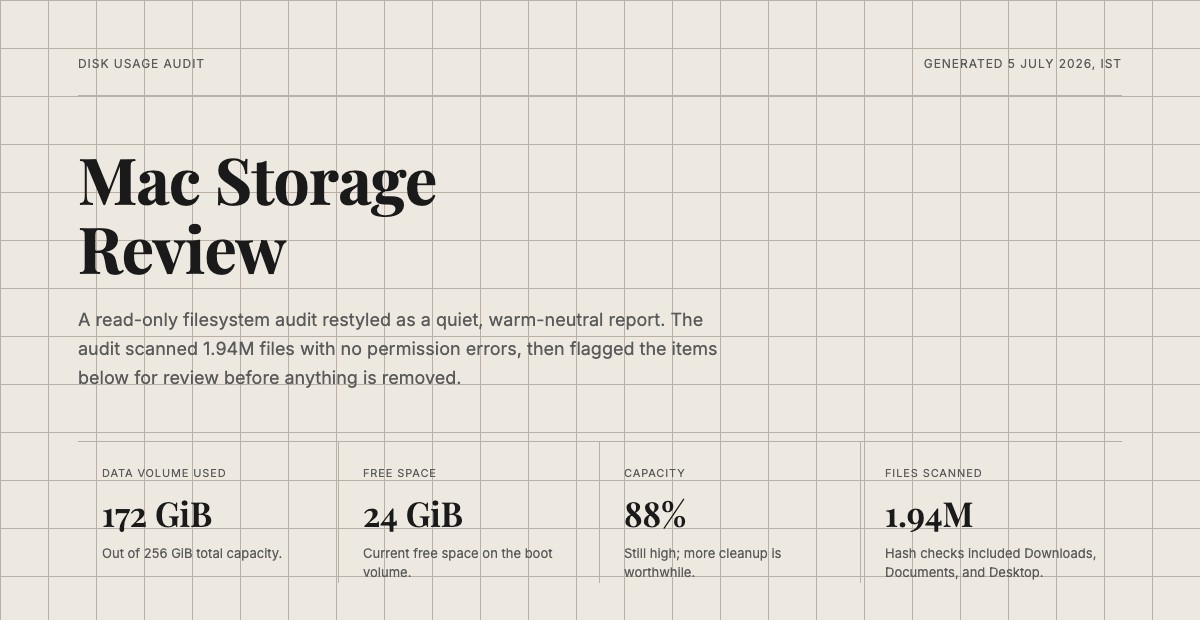
The summary Codex generates
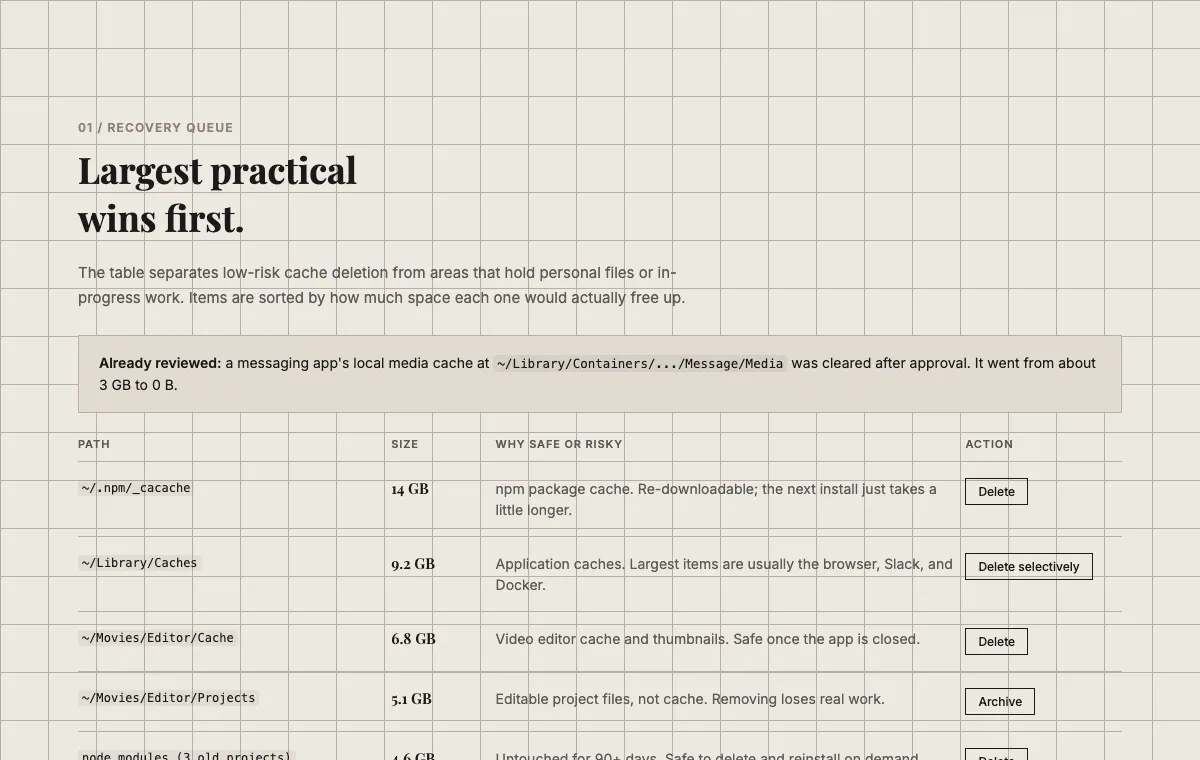
The recovery queue table
3
Step
Read What It Found
My disk was at 96% full with 9.5GB free. Codex came back with one report, sorted by size impact. Typical finds:
What people typically find
- Package manager caches (npm, pip, Homebrew): safe to delete
- Old node_modules folders in dormant projects: safe to delete
- Video editor caches (Premiere, CapCut, Final Cut): safe once the app is closed
- Old .dmg and .pkg installers in Downloads: safe to delete
- Messaging app media (WhatsApp, Telegram, Slack): review first
- Xcode or Android Studio derived data: safe if you're not mid-project
- Old Time Machine snapshots and iOS backups: safe once backed up elsewhere
- Duplicate files in Downloads, Documents, Desktop: easy wins
4
Step
Approve The Cleanup, One Item At A Time
I cleared items one by one. The biggest win was my messaging app's media cache: 9.5GB to 20GB free in one shot.
Then I asked Codex to flag apps I never use. Removing two of those plus a stale npm cache got me to 24GB free, at 88% capacity instead of 96%.

Claude Master Guide
The complete ByteMint Claude collection
Buy →

Join ByteMint's Inner Circle
WhatsApp Community
Join →
For teams
AI automation and hands-on workshops for your team.